Inject Playful Energy with the Student Typeface
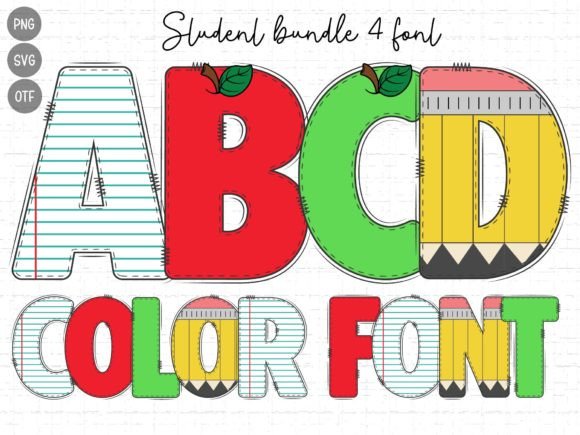
Every now and then, a design project lands on your desk that demands more than just legibility—it demands personality. If you are working on a brand identity for a toy store, a layout for a children’s book, or graphics for an elementary school event, sterile corporate fonts simply won’t do the job. You need something that feels authentic, energetic, and youthful. This is where the Student font steps in to save the day. It isn’t just a collection of letters; it is a vibe. With its chunky letterforms and spirited aesthetic, Student captures the innocence of childhood while maintaining the structure needed for professional design work.
As a premium font, Student is designed to mimic the bold, rounded shapes often associated with early learning, but it does so with a level of polish that distinguishes it from amateur handwritten font styles. It embodies a sense of playfulness that is difficult to find in standard sans serif font libraries. When you look at the curves and weight of the typeface, you immediately get a sense of warmth and approachability. It feels safe, fun, and inviting—exactly the emotional triggers you want to pull when targeting parents, children, or educators.
Visual Characteristics and Personality
The defining feature of the Student typeface is its visual weight. It is a display font, meaning it is built for headlines, titles, and short bursts of text where impact is the priority. The letters are thick and blocky, ensuring high visibility even at a glance. However, unlike aggressive geometric fonts, the corners in Student are often softened. This subtle rounding gives the typography a "friendly" face, making it less intimidating for young readers.
The personality of this creative font is undeniably authentic. It avoids the overly digital look of modern tech brands and instead embraces a tactile quality. It feels like something you might see on a chalkboard or a colorful poster in a library. This authenticity is crucial for brand identity work in the education sector. If your typography feels fake or too corporate, your audience will disengage. Student bridges the gap between a professional serif font structure and the whimsical nature of a doodle, offering a unique middle ground for designers.
Best Applications: From Digital to Print
Understanding where to deploy Student is key to maximizing its potential. Because it is a display font, you should avoid using it for long paragraphs of body text. The chunky nature of the letters can become overwhelming if used for 12-point text in a report. Instead, reserve it for high-impact areas.
In logo design, Student shines. For businesses like kindergartens, tutoring centers, or kids' clothing lines, this font provides an instant visual shorthand for "child-friendly." It creates a brand identity that is memorable and recognizable. Similarly, in packaging design, particularly for snacks or toys, the font grabs attention on crowded shelves. Its thick strokes ensure that the product name stands out against busy background graphics.
For web design, Student works exceptionally well for hero sections, call-to-action buttons, and navigation menus on sites aimed at families. It adds a layer of modern typography flair without sacrificing usability. On social media, where you have mere seconds to stop a user from scrolling, the bold nature of Student is a powerful asset. It makes social media graphics pop, ensuring your message is read instantly on small mobile screens.
Furthermore, consider this typeface for editorial design. If you are publishing a magazine for parents or a workbook for students, using Student for chapter titles and pull quotes can break up the monotony of standard text. It provides visual rest points that keep the reader engaged. Even for personal projects, such as scrapbooking or party invitations, this font adds a professional touch that generic system fonts cannot replicate.
Strategic Impact on Brand Perception
Choosing a font is rarely just about aesthetics; it is a strategic decision that influences how your audience perceives your brand. Typography has the power to establish trust, signal quality, and evoke emotion. When you choose Student, you are signaling that your brand is approachable, supportive, and perhaps a little bit fun.
This shift in perception can directly impact audience engagement. A playful typeface invites interaction. It suggests that a website or a brochure is easy to understand and not overly academic. For small business owners in the education or childcare space, this can lower the barrier to entry for new customers. Parents are more likely to trust a learning center that looks welcoming rather than one that looks like a law firm.
Consistency is another major factor. When you use a versatile display font like Student across all your touchpoints—from your website header to your email signatures and printed flyers—you create a cohesive ecosystem. This visual consistency builds brand recognition. Over time, people will start to associate the specific shape and weight of the Student letters with your specific services. This is the hallmark of effective modern typography usage.
Practical Guidance for Implementation
Before integrating Student into your next project, it is wise to evaluate the fit and test the execution. Here is some practical advice for designers and creators:
- Evaluate the Tone: While Student is versatile within its niche, it is not a universal solution. If your project requires high seriousness, such as a medical report or a financial statement, this font will undermine your credibility. Use it strictly for contexts where friendliness is an asset.
- Font Pairing: Because Student is a bold display font, it requires a neutral partner for body text. Pair it with a clean, readable sans serif font or a classic serif font. A combination of Student for headers and a font like Open Sans or Lora for the content creates a balanced visual hierarchy. Avoid pairing it with other decorative or script font styles, as this will create visual chaos.
- Readability Testing: Always test your typography at the actual size it will be viewed. A creative font might look great on a 27-inch monitor but become illegible on a 5-inch phone screen. Ensure there is enough spacing (kerning and tracking) between the chunky letters to prevent them from blurring together.
- Licensing and Assets: Ensure you are using the correct version of the font. Since Student is a commercial font, verify that your license covers your intended use, whether it is for a single client project, unlimited print runs, or web embedding. Using legitimate design assets protects you legally and ensures you have access to the full character set and updates.
In conclusion, the Student typeface is a robust tool for anyone looking to inject energy into their visual communications. It moves beyond the limitations of standard typography to offer a solution that is both functional and emotionally resonant. Whether you are designing a logo for a new tutoring app or laying out a flyer for a school fundraiser, Student provides the chunky, authentic aesthetic needed to connect with your audience. By pairing it wisely and using it strategically, you can elevate your projects from mundane to memorable.