Pixel Font: Capturing Retro Charm for Modern Designs
There's a specific kind of nostalgia tied to the early days of digital screens. It’s the memory of 8-bit video games, early operating systems, and the distinct blocky text that defined an era. While modern typography has evolved towards sleek, high-resolution vectors, the aesthetic of the pixel remains powerful. It evokes a sense of authenticity, tech-savviness, and playful retro energy. For designers looking to harness this vibe without compromising on file compatibility, Pixel Font offers a distinct solution. It isn't just a typeface; it is a bridge between the foundational era of computer graphics and contemporary digital artistry.
The Anatomy of the Pixel Aesthetic
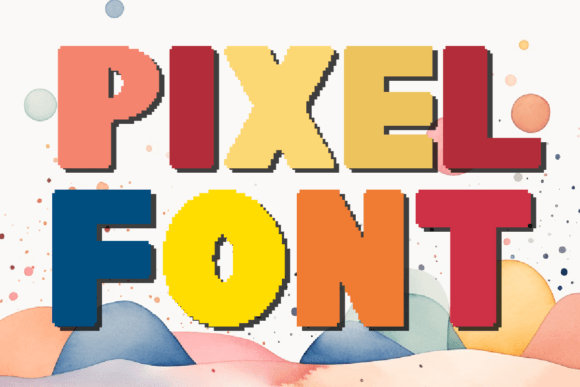
Understanding the visual weight of Pixel Font is key to using it effectively. Unlike a standard serif font or sans serif font, which relies on smooth curves and varying stroke weights, Pixel Font is constructed on a grid. The visual characteristics are defined by their uniformity and geometric precision. It features 26 capital letters and 10 numbers (0-9), designed to mimic the limitations and charm of low-resolution displays.
The personality of this display font is unapologetically digital. It feels technical yet accessible. In the hierarchy of design, it acts as a spotlight, drawing the eye immediately due to its unique texture. It avoids the fluidity of a script font or a handwritten font, instead opting for a structured, blocky stance. This gives it a specific "voice"—one that speaks of coding, gaming, and the foundational logic of the internet. However, because it comes in both OTF and TTF files, it behaves like a standard premium font, allowing you to scale it and apply it across different operating systems without the pixelation artifacts associated with actual bitmap images.
Strategic Applications: Where Pixel Font Shines
As a creative font, Pixel is versatile, but it demands context. It is not the tool for writing long-form body text in a novel, but it is an essential design asset for specific scenarios where impact matters more than readability at small sizes.
Branding and Logo Design
In logo design, distinctiveness is currency. If your brand identity leans towards technology, software development, indie gaming, or even a quirky, modern cafe with a tech theme, Pixel Font offers immediate recognition. It signals to the audience that the brand is connected to the digital world. When used for a wordmark, the blocky geometry creates a strong silhouette that is easy to remember.
Digital Presence and Web Design
For web design, this typeface works exceptionally well for headers, navigation menus, or call-to-action buttons where you want a "clickable" feel. It adds a layer of interactivity to the visual experience. Similarly, in social media graphics, where users scroll rapidly, the high-contrast, blocky nature of Pixel stops the thumb. It is perfect for announcing sales, tech updates, or gaming streams. It cuts through the noise of standard modern typography.
Editorial and Packaging
Don't limit this font to screens. In editorial design, such as magazines or zines covering culture and technology, Pixel can be used for pull quotes or section headers to break up the monotony of standard body text. In packaging design, particularly for electronics, snacks targeting gamers, or retro-themed merchandise, the font adds a tactile, nostalgic quality that appeals to a demographic that grew up in the 80s and 90s.
Technical Guidance and Pairing Strategies
Using a commercial font like Pixel effectively requires a bit of strategy. You aren't just picking letters; you are managing readability and visual flow.
Font Pairing and Hierarchy
Because Pixel Font is a display font, it creates a natural hierarchy when paired with a neutral body type. A common mistake is pairing it with another stylized font, which creates visual clutter. Instead, pair Pixel with a clean, geometric sans serif font for your body copy. The smooth lines of the sans serif will contrast beautifully with the jagged edges of the pixel grid, making both fonts look better by comparison. This contrast ensures your brand identity looks professional rather than chaotic.
Readability and Testing
Legibility is the priority. While the font includes a full set of capitals and numbers, you should test how these characters interact in your specific software. Because it is a creative font, spacing (kerning) might need manual adjustment depending on the size. For web use, ensure the font size is large enough that the "pixels" don't blur into an unreadable blob on high-definition screens. Always view your design on both mobile and desktop to ensure the retro charm translates correctly to different resolutions.
Licensing and Versatility
One of the practical advantages of this package is the inclusion of both OTF and TTF files. This ensures compatibility across almost all design software, from Adobe Creative Suite to open-source alternatives. Furthermore, the licensing typically covers a wide range of uses. Whether you are a freelancer creating a logo for a client or a hobbyist designing a personal project, the flexibility of the font pairing options and file types means you can integrate Pixel into your workflow immediately. It is a robust commercial font asset that supports both personal exploration and professional output.
Ultimately, Pixel Font is more than just a stylistic choice; it is a communication tool. It tells your audience that you understand the roots of digital culture while operating in the present. By leveraging its unique grid-based structure and pairing it with complementary typography, you can create designs that are not only visually striking but also strategically sound. Whether for a retro gaming logo, a tech blog header, or a unique packaging concept, Pixel provides the foundation for limitless creative possibilities.